I’ve been iterating on my Neovim config for a while, and recently did a round of changes substantial enough to write up. The headline item is a complete rewrite of the statusline, but there were a few other things worth covering too.
The Statusline
The old statusline was functional but minimal — a basic mode indicator, git branch from a shell call, and a file path. I replaced it entirely with something hand-rolled in Lua.
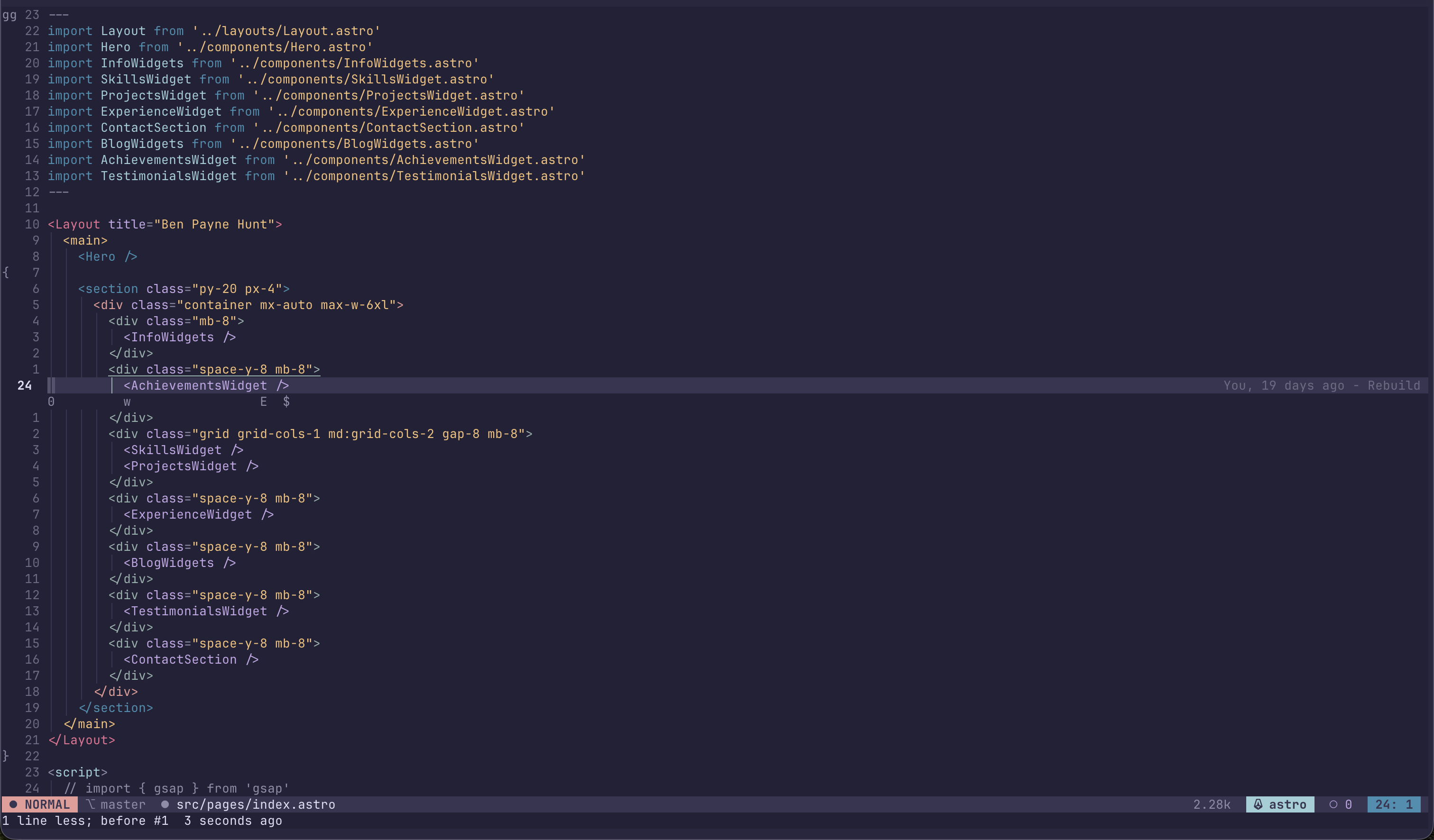
Mode indicator
The mode pill is the most visible change. Each mode now gets its own highlight group, derived from the active colorscheme rather than hardcoded hex values:
local mode_hls = {
    ["n"]   = "SLModeNormal",   -- Function color
    ["i"]   = "SLModeInsert",   -- String color
    ["v"]   = "SLModeVisual",   -- Special color
    ["R"]   = "SLModeReplace",  -- DiagnosticError color
    ["c"]   = "SLModeCommand",  -- DiagnosticWarn color
    ["t"]   = "SLModeTerminal", -- DiagnosticInfo color
}
The colors are pulled from existing highlight groups at runtime, so the mode pill automatically matches whatever colorscheme is active. No hardcoding, no manual updates when switching themes.
Git branch via gitsigns
The old approach called git rev-parse --abbrev-ref HEAD as a shell command every time the statusline rendered. The new one reads from vim.b.gitsigns_head, which gitsigns maintains automatically. It’s faster and removes a redundant shell call.
Filetype with brand colors
This is the part I had the most fun with. The right side of the statusline shows the current filetype, and each language renders with its actual brand color — TypeScript in #3178C6, Go in #00ADD8, Python in #3776AB, and so on across around 30 languages.
The implementation dynamically creates a highlight group per filetype and uses perceived luminance to decide whether the foreground should be light or dark against the brand color:
local luminance = 0.299 * r + 0.587 * g + 0.114 * b
local fg_int = luminance > 128
    and (vim.api.nvim_get_hl(0, { name = "StatusLine" }).bg or 0x1a1a1a)
    or  (vim.api.nvim_get_hl(0, { name = "Normal" }).fg    or 0xe0e0e0)
These groups are cached after first creation and cleared on ColorScheme to ensure correctness when switching themes.
Runtime version detection
Next to the filetype, the statusline shows the active runtime version — python 3.12, node v22.11, go1.22, etc. These are fetched once per session with a shell call and cached. It’s a small thing but useful when you’re regularly switching between projects with different toolchain requirements.
File-level details
The file segment shows the relative path with a colored dot indicating modified state — amber if there are unsaved changes, muted if clean. File size appears on the right, formatted as bytes, kilobytes, or megabytes depending on the actual size.
Diagnostics show error and warning counts from the LSP. When everything is clean, a small ○ 0 appears. LSP progress messages appear transiently during indexing and disappear after a short delay via vim.defer_fn.
Dynamic Highlights
The highlights system was reworked to derive everything from the active colorscheme. Rather than defining specific colors, each highlight group is constructed by sampling from existing groups:
{ "SLModeNormal", { fg = sl_bg, bg = hl("Function").fg, bold = true } },
{ "SLBranch",     { fg = hl("Comment").fg, bg = sl_bg } },
{ "SLModified",   { fg = hl("DiagnosticWarn").fg, bg = sl_bg } },
This means the entire statusline and window separator styling updates automatically when you change colorschemes, with no manual intervention. The ColorScheme autocmd re-runs set_highlights() whenever a new theme is applied.
Ghostty Sync
I use Ghostty as my terminal, and one small utility I added syncs the active Neovim colorscheme’s palette into the Ghostty config automatically. When you switch colorscheme in Neovim, Ghostty picks up the background, foreground, cursor, selection colors, and the full 16-color palette from the current theme’s highlight groups.
It’s not something I think about day-to-day — it just means the terminal and editor always match.
New Plugins
A few plugins made it into the config and have actually stuck around:
smear-cursor.nvim — Animates the cursor with a smear effect as it moves across the buffer. Works in all terminals — no GUI required. The smear trails behind the cursor position and fades out, making large jumps easier to track visually without being distracting during normal editing.
nvim-cursorline — Cursorline with a 1-second timeout (so it fades when you stop moving) and word-under-cursor underline. The timeout is the key feature; a permanent cursorline adds visual noise, but a briefly-visible one is useful for orientation after a big jump.
tiny-glimmer.nvim — Subtle animations on yank, paste, undo, redo, and search. Yank fades out, paste fades in, search pulses. The durations are short (200–400ms) so it’s informative rather than distracting.
precognition.nvim — Overlays motion hints in the gutter and on the current line: w, b, e, {, }, G, gg, etc. Useful for reinforcing motion habits when you catch yourself reaching for arrow keys.
indent-blankline.nvim with rainbow delimiters — Scope highlighting using rainbow colors for brackets and indent guides. The colors cycle through the rainbow delimiter palette, making nested structures visually distinct.
Colorscheme
After some experimentation with nightfox variants, I’ve landed back on Rose Pine. It pairs well with the dynamic highlight system — the colors it exposes for Function, String, Keyword, and the diagnostic groups map cleanly to the mode pill palette and produce something that looks intentional rather than accidental.
The config is on GitHub if you want to dig into the specifics.